关于条款隐私政策联系
 
正在更新
1Writer - Markdown Text Editor

1Writer - Markdown Text Editor

发布日期:2013-08-14
© 2025 Ngoc Luu
1Writer - Markdown Text Editor - QR码
版本 3.3.8
17+
App Store 下载
版本 3.3.8
17+
App Store 下载
发布日期:2013-08-14
© 2025 Ngoc Luu
Re

iPhone 屏幕截图

截屏
截屏
截屏
截屏
截屏
截屏
截屏
截屏
截屏

iPad 屏幕截图

截屏
截屏
截屏
截屏
截屏
截屏
截屏
截屏
截屏

简介

1Writer combines all the basic text editing features you would expect with all the advanced features you will ever need. Use 1Writer to write, research, revise, and share your ideas with maximum efficiency.
- - - - - - - - - -
"The only Dropbox- and Markdown-enabled text editor for iPhone that’s clicked with me has been 1Writer. It’s simple, looks great, and gets the job done." - TheSweetSetup.com
"Really great app, really recommend it." - Federico Viticci, MacStories.net
"The app interface is beautiful and distraction-free, with loads of other awesome features lurking beneath its simple exterior. It's now my go-to iPhone text editor." - Chris Gonzales, ToolsandToys.net
"For users that want a great visual experience paired with great support for custom actions and third party apps, 1Writer is an excellent choice." - iMore.com
"1Writer is the most powerful text editor available for iPhone." - Phillip Gruneich
- - - - - - - - - -
CREATE
- Write :: generate and edit plain text or Markdown files.
- Preview :: see the formatted results with Markdown syntax highlighting while you write and a full, rich-text preview when you're done.
- Extended keyboard :: a convenient row of buttons for navigation, formatting, special characters (customizable--pick the characters you use the most).
- Insert photo :: pick a photo or take a new one, and 1Writer will upload it to Dropbox and generate the Markdown-syntax to add it to your document--all in a single action!
- Snippets :: TextExpander Touch support.
- Custom URL actions :: insert a document template, encode a selection and replace the original text, look up synonyms and much more.
- JavaScript :: create even more powerful custom actions using JavaScript—text manipulation, perform a find & replace, interact with the clipboard—the possibilities are endless.
IMPORT
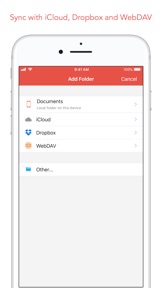
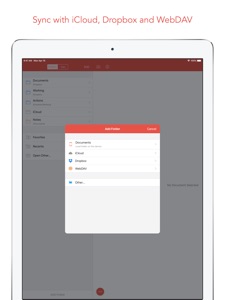
- Sync with iCloud, Dropbox and WebDAV.
- Share extension :: send text to 1Writer from other apps. In Safari, the extension uses the current URL, page title and selected text to create a new document.
- Create, append, prepend, or replace text directly from other apps using the 1Writer URL scheme.
EXPORT
- CloudApp and Dropbox :: generate a link to share your document in plain text or PDF.
- Evernote :: pick your notebook, add tags and turn a text selection or the entire document into a new, rich-text note.
- Copy HTML :: put the formatted text for your document directly on the clipboard.
- Custom actions :: open a web search, tweet a selection, save a series of items in a list and much more.
PERSONALIZE
- Support Dark Mode on iOS 13.
- 2 dark themes for more comfortable reading and writing at night.
- Choose from 20 different fonts.
- Bookmark and sync the Dropbox/WebDAV folders you want to have quick access to the sub-folders and documents you need.
- Use a passcode or Touch ID/Face ID to protect the app from unauthorized users.
RESEARCH
- In-app web browser :: research, look up information without having to leave the app.
- Bookmarks :: create and access your favorite websites.
- Save the current text selection to the clipboard in Markdown syntax.
- 1Password support :: login to all your accounts using the 1Password extension.
EVEN MORE GREAT FEATURES
- Drag and drop.
- Open in Place.
- Multiple windows on iOS 13.
- MultiMarkdown.
- Search documents from Spotlight.
- Find & replace within document.
- Photo and PDF preview.
- Today widget :: access your recent documents from the Notification Center or create a new document in one tap.
- Checklist support :: create a list of things to do or topics to research, and easily check them off.
- Full-text search and hashtag support :: search within a folder to find the document you need, and view related documents that have the same tag.

版本 3.3.8 中的新功能

Bug fixes.

卖方

名称

Ngoc Luu

网址

信息

开发商

类别

版本

3.3.8

大小

19.7 MB

Game Center

VPP Device Licensing

评分

因含有以下内容而被评级为 17+:
无限制网页访问

兼容性

iOS 13.0 或更高

设备

iPhone 5s, iPhone 6, iPhone 6 Plus, iPhone 6s, iPhone 6s Plus, iPhone SE, iPhone 7, iPhone 7 Plus, iPhone 8, iPhone 8 Plus, iPhone X, iPhone XR, iPhone XS, iPhone XS Max, iPhone 11, iPhone 11 Pro, iPhone 11 Pro Max, iPhone SE(第 2 代), iPhone 12, iPhone 12 Pro, iPhone 12 Pro Max, iPhone 12 mini, iPhone 13, iPhone 13 Pro, iPhone 13 Pro Max, iPhone 13 mini, iPhone SE(第 3 代), iPhone 14, iPhone 14 Plus, iPhone 14 Pro, iPhone 14 Pro Max, iPhone 15, iPhone 15 Plus, iPhone 15 Pro, iPhone 15 Pro Max, iPhone 16, iPhone 16 Plus, iPhone 16 Pro, iPhone 16 Pro Max, iPhone 16e, iPhone 17, iPhone 17 Pro, iPhone 17 Pro Max, iPhone Air, iPhone 17e, iPad(第 5 代)WLAN, iPad(第 5 代)WLAN + Cellular, iPad(第 6 代)WLAN, iPad(第 6 代)WLAN + Cellular, iPad Pro, iPad Pro (Cellular), iPad Pro(9.7 英寸), iPad Pro(9.7 英寸) (Cellular), iPad Pro(12.9 英寸,第 2 代), iPad Pro(12.9 英寸,第 2 代) WLAN + Cellular, iPad Pro(10.5 英寸), iPad Pro(10.5 英寸) WLAN + Cellular, iPad Pro(11 英寸), iPad Pro(11 英寸) WLAN + Cellular, iPad Pro(12.9 英寸,第 3 代), iPad Pro(12.9 英寸,第 3 代) Wi-Fi + Cellular, iPad Air, iPad Air (Cellular), iPad Air 2, iPad Air 2 (Cellular), iPad Air(第三代), iPad Air(第三代) WLAN + Cellular, iPad mini Retina, iPad mini Retina (Cellular), iPad mini 3, iPad mini 3 (Cellular), iPad mini 4, iPad mini 4 (Cellular), iPad mini(第 5 代), iPad mini(第 5 代)WLAN + Cellular, iPad(第 7 代)WLAN + Cellular, 11 英寸 iPad Pro(第 2 代), 11 英寸 iPad Pro(第 2 代) 无线局域网, 12.9 英寸 iPad Pro(第 4 代), 12.9 英寸 iPad Pro(第 4 代) 无线局域网, iPad Air(第 4 代)(Wi-Fi), iPad Air(第 4 代)(WLAN + Cellular), iPad(第 8 代)WLAN, iPad(第 8 代)WLAN + Cellular, 11 英寸 iPad Pro(第 3 代), 11 英寸 iPad Pro(第 3 代) 无线局域网, 12.9 英寸 iPad Pro(第 5 代), 12.9 英寸 iPad Pro(第 5 代) 无线局域网, iPad(第 9 代), iPad(第 9 代)WLAN + Cellular, iPad mini(第 6 代), iPad mini(第 6 代)WLAN + Cellular, iPad Air(第 5 代), iPad Air(第 5 代) Wi-Fi + Cellular, 11 英寸 iPad Pro(第 4 代), 11 英寸 iPad Pro(第 4 代) 无线局域网, 12.9 英寸 iPad Pro(第 6 代), 12.9 英寸 iPad Pro(第 6 代) 无线局域网, iPad(第 10 代), iPad(第 10 代) 无线局域网, 11 英寸 iPad Air (M2) 无线局域网机型, 13 英寸 iPad Air (M2) 无线局域网机型, 13 英寸 iPad Air (M2) 无线局域网 + 蜂窝网络机型, 11 英寸 iPad Pro (M4) 无线局域网机型, 11 英寸 iPad Pro (M4) 无线局域网 + 蜂窝网络机型, 13 英寸 iPad Pro (M4) 无线局域网机型, 13 英寸 iPad Pro (M4) 无线局域网 + 蜂窝网络机型, iPad mini (A17 Pro) 无线局域网机型, iPad mini (A17 Pro) 无线局域网 + 蜂窝网络机型, iPad (A16) 无线局域网机型, iPad (A16) 无线局域网 + 蜂窝网络机型, 11 英寸 iPad Air (M3) 无线局域网机型, 11 英寸 iPad Air (M3) 无线局域网 + 蜂窝网络机型, 13 英寸 iPad Air (M3) 无线局域网机型, 13 英寸 iPad Air (M3) 无线局域网 + 蜂窝网络机型, 11 英寸 iPad Pro (M5) 无线局域网机型, 11 英寸 iPad Pro (M5) 无线局域网 + 蜂窝网络机型, 13 英寸 iPad Pro (M5) 无线局域网机型, 13 英寸 iPad Pro (M5) 无线局域网 + 蜂窝网络机型, 11 英寸 iPad Air (M4) 无线局域网机型, 11 英寸 iPad Air (M4) 无线局域网 + 蜂窝网络机型, 13 英寸 iPad Air (M4) 无线局域网机型, 13 英寸 iPad Air (M4) 无线局域网 + 蜂窝网络机型, iPod touch(第六代), iPod touch(第 7 代)

语言

中文, 德文, 日文, 英文

App Store:用户评分

评分及评论

4.2/5 (50 份评分)

App Store:买家评论

2023-05-06

没有语法高亮

30块钱还没有语法高亮....上次更新是7个月前,不知道是不是跑路了。慎买
鲨鱼加糖
2022-07-18

建议

文件属性里增一个位置信息的记录。
硕岚山
版本 3.1
2022-02-10

ios端最好的markdown编辑器

windows用typora,ios用1writer,坚果云webdav同步,完美💯。拒绝🙅all in one,希望作者不要跑路保持初心。
风吹古木晴天雨
版本 2.9.2
2021-08-31

WebDAV! WebDAV! WebDAV

👍🏻
Lkwfhak;hfg
版本 3.0.4
2021-03-23

Line Numbers in editor

Feature Request😊
XXiiU22
版本 3.3.5
2021-02-26

差到爆!

差劲到你姥姥家!n多bug!还好意思挺个脸收费!还不退费!
AppleHappyGirl
版本 3.2
2021-01-09

编辑器非常方便,界面较为舒适,支持webdav文件同步

价格相对合适,如果也推出pc版或者mac版,就值得五星了。
websterxiao
版本 2.5.5
2020-11-27

数学公式

请问此软件是否支持数学公式,如果没有,希望尽早添加本功能。真的十分迫切需要支持数学公式的编辑器。
vgfjvh
版本 3.3.6
2020-10-27

非常强大,但仍有bug存在

非常强大,但仍有bug存在。目前最严重的问题是有时触控莫名其妙失灵的问题,点击文本的某个位置,光标却跳到另外的位置,非常影响正常使用;然后屏幕下方的两个快捷按钮有时会忽然失去响应,点击没有反应,可能过一会儿又自己好了;还有导出pdf时主题标签会被误识别为一级标题,而不是“#标签”,希望能改进一下。如果能修复这几个bug,这个软件就是最完美的写作软件。
back2sky
版本 3.0.2
2020-10-18

will there be code highlighting in the future?

I really need code highlighting🥺
512471zwq
版本 2.9.4
2020-10-06

是我想要的md文本编辑器

感谢开发者开发了这么一款好用的编辑器,同时我觉得有几个点用得不是很舒服:
1.编辑文档右下角的加号(➕)非常不方便,误触会增加一个新的文档,感觉很干扰
2.Ipad下不知道能不能支持编辑界面和预览界面分屏显示
谢谢,期待恢复
howie6879
版本 3.3.1
2020-09-14

How to remove service link from WebDAV?

I have linked the service with WebDAV.
But when I want to remove the link, I couldn’t find the way how to do it.
Even after uninstall and reinstall, the WebDAV address still there.
This made me crazy. Hope you can tell me how to solve it.
为知用户
版本 2.0.2
2020-09-14

where is snippets function?

I can’t find out how to add snippets in this app which is introduced in the app features.
If it’s somewhere I missed, please tell me....
LIFE.N.G
版本 2.9.1
2020-09-06

感觉不错

感觉不错
lll637244388
版本 2.8.2
2020-07-28

does not support google drive

does not support google drive. I wasted my money.
马秋比球
版本 2.7
2020-07-23

一直闪退,希望能修复

如题
s z y
版本 3.3
2020-06-18

喜欢

试了很多,这个最好。
陌筱哲
版本 3.0.3
2020-04-18

Hello do you Chinese language

你好,我的webdav密码变了,可是无法更改。无法取消关联,无法使用了。
alixuni
版本 2.2.2
2020-03-19

希望有Mac版本

如题,希望有Mac版本
015815
版本 3.1.1
2020-03-07

Onedrive不支持

总体不错,希望能支持onedrive,因为onedrive不支持webdav了。。
Good app, except doesn’t support Onedrive. Hope could be fixed in future versions.
CharyS117
版本 2.5.2
2019-12-19

目前最好的markdownapp之一

不像别的app,做的一般还收费。
能支持网盘或者WebDAV的真的少得可怜。
但还有几点不足。
1。像mweb一样的大纲显示,或者typora一样也可以
2。WebDAV引入的本地图片无法显示,哪怕在WebDAV设置了相对路径。
其实我只想找一个iOS端端typora而已
都市先锋家
版本 1.1.2
2019-06-09

我的建议

很高兴有了新的版本。
优点:换了mweb等n多Markdown最后还是选的1writer。
缺点如下:
1. 目前还不支持[toc]浏览。
2. 对于#的标签功能,还没有自定义的方法。主要我需要删除一些,但是没有删除的方法。
3. 对于缩进的列表,不能自动重新排列序号。
用清单,安排生活
2019-06-02

对于一个需要码字的人来说真的很好用

强烈推荐。而且iCloud功能让手机和ipad无缝衔接,简直太棒了
egeria1225
2019-05-15

希望今后增加文本高亮语法

找了好久,估计是还不支持文本高亮
褚渐
2019-04-30

math LaTeX

pls support math latex , thanks
出门的骨头
2019-04-18

闪退严重

闪退严重
西兰花炒带鱼
2018-11-26

data sync

always fail to reload data from dropbox
Vanya Alyo
2018-11-13

非常好用的工具

美中不足的就是界面略丑,预览界面更丑,但愿能改进!
象鼻子和三歪歪
2018-11-06

好软件,但是对12.9寸iPad pro适配不好

用过最舒服的码字软件,可以用文件夹的方式管理文稿,直接保存为txt格式,就跟pc上的文本编辑软件那样。但是对ipad pro 12.9寸的适配不太好,横屏模式下文档编辑区域左右两边空出一大片,只有中间一小块显示文稿,浪费了12寸这么大的屏幕,而在更小屏的ipad上没这个问题
gobgo卡欧
2018-10-26

改善很好用

很好用
杨炎old
2018-05-03

美中不足的优雅

用了一段时间,非常喜欢这个app的简洁优雅和方便。内置浏览器和多样的脚本扩展功能非常好用,希望继续保持。
但是还有一些美中不足的地方,希望可以在后续版本中得到完善。
1.希望可以自更改页面颜色。纯白的背景并不是每个人都喜欢,除了已经增加的夜间模式,希望增加*米黄色*的写作背景。
2.希望可以自定义开始界面。一进入程序,是一大片空白和“未选定文档”,非常没有效率。希望可以*允许用户把开始界面改成文件列表*
3.界面菜单的UI设计还可以更加iOS11一点。
以上。祝app越来越好。
海瑟姆
2018-04-22

Some Wishes.

Dear Developer and author:
I'm Looking forward to add a function of directory and enhancing the syntax of MD,such as TOC...
猿创动力
2018-03-29

刚开始用,感觉不错

可以更换主题,使用起来也比较方便
LiMaoooooowithZhz
2017-12-04

为什么保存不到印象笔记了

之前写好的文章可以轻松保存到印象笔记,现在找不到那个功能了,而且绑定印象笔记也绑定不了,授权多次都没有用
微笑着看她
2017-06-23

support Toc plz

support Toc plz.
iDragonfly2050
2017-02-11

越來越強大!

挺長時間沒有用了,今天更新了一下,wow,已經變得如此的強大!當年原價購入,一直免費更新到現在,實在是太良心啦!不再給個五星評價都不行,謝謝開發商一直以來的辛勤工作!
桺斜斜
2016-01-15

希望增加对其他网盘的支持

总体上写作体验很流畅,但是对网盘的支持太少了,强烈希望能增加对onederive和google drive 的支持。
locker Moter
2015-08-29

卡顿

更新之后变卡了,并且找不到通知中心插件了。个案吗?
riyatel
2015-07-07

很舒畅的写作感觉!

大赞!
由于可以自行关闭扩展的辅助键位,所以在写作的时候可以做到真正的清爽与专注,大赞!
由于可以随心情更换界面色彩,所以就避免了写作时界面一成不变的枯燥感觉,大赞!
由于可以设置文字的行间距,所以就可以自行调整最舒服的阅读体验,大赞!
大赞!
建议:一是允许在 iCloud 里创建文件夹,二是允许自调界面色彩!
期待!
Lu Yingcan
2015-03-16

不能和印象笔记连接

真是愁死我了。。。怎么授权都不行。。。
黄毛圈圈
2015-02-27

感觉比 Dayone 顺手

用过的支持 markdown 的编辑器只有 Dayone。相比之下,1Writer 更美些,内置浏览器的功能也很棒,非常适合对照网页写作或插入链接,Markdown 的效果是所见即所得的。貌似不支持 iCloud 同步?Dropbox 诚然好,无奈有墙啊… 每次要开 VPN
rabitv
2015-01-29

手机码字软件第一推荐!!!

### 非常好的一款应用。
* 最大的优点是扩展键盘上可以自定义字符与标点符号,预览也很方便(只是预览的位置与编辑的位置不能同步,望改进之),可以没有mac版本。
* 我现在是在mac上用byword for mac(可以全屏,可以聚焦到一段或一行)写具体内容,再同步到iCloud上。手机上就用1writer打开iCloud里的文件,在碎片化时间里预览、修订和记录灵感思路,非常棒!
* 另外说一下byword,同样都是18元人民币,同样都买了,到我仍觉得1writer更好,因为可以自定义扩展键盘上的字符,还可以发到印象笔记里保存。
* 再八卦一下ia writer,评论说对汉字的支持不好,我就怕了。后来下载了ia writer pro for mac,用了一下觉得比byword for mac复杂,而且还不能设置字体和字体的大小,反正用起来没byword顺手,不建议买。
* *总之,推荐电脑上用byword for mac,手机上用1writer,然后用iCloud同步连接。*
非常无语d用户甲
2013-09-02

Gorgeous!

Very neat and easy to use. Love the combination of tags and markdown. Can be used for brainstorming.
Keep it up!
freetiger18