正在更新


iPhone 屏幕截图



iPad 屏幕截图


简介
To be sent to the DICOM server the images taken with iPhone, DICOM-Shot is a simplified modality application to be able to carry easily.
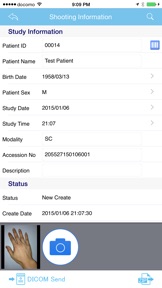
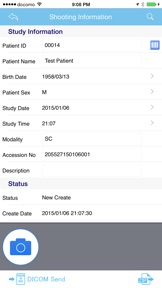
1) Enter patient information
2) Shot with iPhone camera the affected area
3) Tap the Send button
Just these three steps, you can be sent to the DICOM server the captured images.
Because if you use the DICOM-Shot application, in the same way as DICOM images images captured by the camera, you will be able to manage DICOM server, It is an application very useful to a centralized management of hospital image.
If PACS server that supports the DICOM communication protocol, since it is possible to be sent, the destination server does not choose the server.
※Transfer Syntax: Implicit VR Little Endian
■ Instructions for use
1) Application after installation, and then enter the configuration information and "Server Settings" and "Client Settings" from the Settings.
※ The server configuration information, please contact the server administrator.
2) Tap the top right of the inspection list the "+" button to register the new inspection.
3) Enter the information of the patient.
- When you tap the search button, you can use the MWM Server.
- It will be filled in automatically if you tap any WorkList.
4) Tap the camera button to activate the camera, take the affected area.
5) Tap the "DICOM send" button to send the image to the DICOM server.
※ If it takes a long time to image sending, you can change the image size options in the Settings.
■ Custom URL Scheme
dicom-shot://
■ Notes
- Requires a Wi-Fi environment to the clinic.
- There is a need for a separate PACS server that supports the DICOM communication protocol.
- Employees shall use, please follow the security policy of the clinic.
- The search conditions to the MWM Server, I find in the "Setting modality" and "sutdy date of the day." It is also possible to search by entering the patient ID.
- it is compressed in ZIP DICOM images, to send the file to the apps Dropbox, OneDrive, such as Osirix HD.
- If you want to delete the data on the inspection list, when you swipe a list of target, "Delete" button will appear, please tap.
- If patient name appears to be garbled, please make the item of Specific Character Set in Settings options to "ISO_IR 192". The problem may be resolved.
- If you want to keep the results of the MWM server, click the add offline button (icon at the bottom left) on the worklist window. You can refer to it from the offline information display button on the shooting information window, which is convenient when you move to an environment where you cannot connect to the MWM server.
- Due to improved iOS security, the first DICOM communication "DICOM-Shot would like to find and connect to devices on your local network." Press "OK" to allow DICOM-Shot Apps to connect to the network.
■ Contact Us
If you have any questions, please contact the following email address.
【dicom-shot@lscc.co.jp】
版本 2.0.3 中的新功能
minor bug fixes
卖方
名称
Life Sciences Computing Corporation
信息
类别
版本
2.0.3
大小
2.6 MB
Game Center
否
VPP Device Licensing
是
评分
因含有以下内容而被评级为 17+:
频繁/强烈的医药或医疗信息
兼容性
iOS 15.0 或更高
设备
iPhone 5s, iPhone 6, iPhone 6 Plus, iPhone 6s, iPhone 6s Plus, iPhone SE, iPhone 7, iPhone 7 Plus, iPhone 8, iPhone 8 Plus, iPhone X, iPhone XR, iPhone XS, iPhone XS Max, iPhone 11, iPhone 11 Pro, iPhone 11 Pro Max, iPhone SE(第 2 代), iPhone 12, iPhone 12 Pro, iPhone 12 Pro Max, iPhone 12 mini, iPhone 13, iPhone 13 Pro, iPhone 13 Pro Max, iPhone 13 mini, iPhone SE(第 3 代), iPhone 14, iPhone 14 Plus, iPhone 14 Pro, iPhone 14 Pro Max, iPhone 15, iPhone 15 Plus, iPhone 15 Pro, iPhone 15 Pro Max, iPhone 16, iPhone 16 Plus, iPhone 16 Pro, iPhone 16 Pro Max, iPhone 16e, iPhone 17, iPhone 17Pro, iPhone 17ProMax, iPhone Air, iPad(第 5 代)WLAN, iPad(第 5 代)WLAN + Cellular, iPad(第 6 代)WLAN, iPad(第 6 代)WLAN + Cellular, iPad Pro, iPad Pro (Cellular), iPad Pro(9.7 英寸), iPad Pro(9.7 英寸) (Cellular), iPad Pro(12.9 英寸,第 2 代), iPad Pro(12.9 英寸,第 2 代) WLAN + Cellular, iPad Pro(10.5 英寸), iPad Pro(10.5 英寸) WLAN + Cellular, iPad Pro(11 英寸), iPad Pro(11 英寸) WLAN + Cellular, iPad Pro(12.9 英寸,第 3 代), iPad Pro(12.9 英寸,第 3 代) Wi-Fi + Cellular, iPad Air, iPad Air (Cellular), iPad Air 2, iPad Air 2 (Cellular), iPad Air(第三代), iPad Air(第三代) WLAN + Cellular, iPad mini Retina, iPad mini Retina (Cellular), iPad mini 3, iPad mini 3 (Cellular), iPad mini 4, iPad mini 4 (Cellular), iPad mini(第 5 代), iPad mini(第 5 代)WLAN + Cellular, iPad(第 7 代)WLAN + Cellular, 11 英寸 iPad Pro(第 2 代), 11 英寸 iPad Pro(第 2 代) 无线局域网, 12.9 英寸 iPad Pro(第 4 代), 12.9 英寸 iPad Pro(第 4 代) 无线局域网, iPad Air(第 4 代)(Wi-Fi), iPad Air(第 4 代)(WLAN + Cellular), iPad(第 8 代)WLAN, iPad(第 8 代)WLAN + Cellular, 11 英寸 iPad Pro(第 3 代), 11 英寸 iPad Pro(第 3 代) 无线局域网, 12.9 英寸 iPad Pro(第 5 代), 12.9 英寸 iPad Pro(第 5 代) 无线局域网, iPad(第 9 代), iPad(第 9 代)WLAN + Cellular, iPad mini(第 6 代), iPad mini(第 6 代)WLAN + Cellular, iPad Air(第 5 代), iPad Air(第 5 代) Wi-Fi + Cellular, 11 英寸 iPad Pro(第 4 代), 11 英寸 iPad Pro(第 4 代) 无线局域网, 12.9 英寸 iPad Pro(第 6 代), 12.9 英寸 iPad Pro(第 6 代) 无线局域网, iPad(第 10 代), iPad(第 10 代) 无线局域网, 11 英寸 iPad Air (M2) 无线局域网机型, 13 英寸 iPad Air (M2) 无线局域网机型, 13 英寸 iPad Air (M2) 无线局域网 + 蜂窝网络机型, 11 英寸 iPad Pro (M4) 无线局域网机型, 11 英寸 iPad Pro (M4) 无线局域网 + 蜂窝网络机型, 13 英寸 iPad Pro (M4) 无线局域网机型, 13 英寸 iPad Pro (M4) 无线局域网 + 蜂窝网络机型, iPad mini (A17 Pro) 无线局域网机型, iPad mini (A17 Pro) 无线局域网 + 蜂窝网络机型, iPad (A16) 无线局域网机型, iPad (A16) 无线局域网 + 蜂窝网络机型, 11 英寸 iPad Air (M3) 无线局域网机型, 11 英寸 iPad Air (M3) 无线局域网 + 蜂窝网络机型, 13 英寸 iPad Air (M3) 无线局域网机型, 13 英寸 iPad Air (M3) 无线局域网 + 蜂窝网络机型, iPad Pro11M5, iPad Pro11M5Cellular, iPad Pro13M5, iPad Pro13M5Cellular, iPod touch(第六代), iPod touch(第 7 代)
语言
日文, 英文
App Store:用户评分
评分及评论
0.0/5 (无平价)
App Store:买家评论
无条目