关于条款隐私政策联系
 
正在更新
eDrawings Pro

eDrawings Pro

发布日期:2012-08-31
© 1999-2024 Dassault Systemes SolidWorks Corporation
eDrawings Pro - QR码
版本 34.2.0057
4+
App Store 下载
版本 34.2.0057
4+
App Store 下载
发布日期:2012-08-31
© 1999-2024 Dassault Systemes SolidWorks Corporation

iPhone 屏幕截图

截屏
截屏
截屏

iPad 屏幕截图

截屏

简介

eDrawings® Pro is the professional 2D and 3D CAD collaboration app for the iPad, iPhone and iPod Touch that can view native SolidWorks® files (part, assembly, drawings), eDrawings files and DraftSight® (DWG™, DXF™) files. You can easily view models and access configurations, drawing sheets, and exploded views for eDrawings files published from SolidWorks and all other supported CAD software.
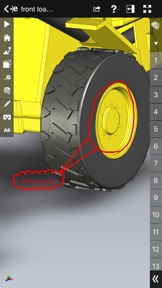
Markup! Measure! Section! eDrawings® Pro takes you to the next level of 2D and 3D collaboration with more functionality, including dynamic cross section views, measurements, markups & annotations and the unique ability to share it all by email!
eDrawings includes Augmented Reality (AR). This allows you to view your 3D models in 1:1 scale into the real world. By simply activating the device’s camera, you can bring your virtual 3D designs in a real context and see them in situ, sitting on your desk or on your conference room table or even in the palm of your hand, through your iPad, Pad mini, iPhone or iPod Touch’s screen. Move around the room and see your design from any perspective.
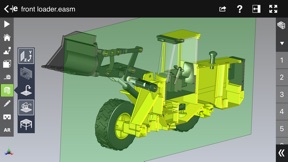
With an intuitive user interface, eDrawings® Pro enables you to dynamically view cross sections of your models in XY, YZ, or ZX directions from both sides and easily drag the cross section plane on screen or with a convenient slider. You can also measure distances in your designs, with easy-to-use selection filters for faces, edges, vertices and holes.
With eDrawings® Pro you can create markups on your drawings, including text notes, freehand notations, dimensions, cross-section views, photos and camera snapshots.
You can share your marked up eDrawings files with others for review and further comments. All markups with history are saved within the eDrawings file.
Features:
* Intuitive and easy-to-use user interface
* Visualize your 3D models in real context with Augmented Reality (AR)
* Open 3D (EASM, EPRT, SLDASM, SLDPRT, IGES, IGS, JT, STEP, STP, IFC), 2D (EDRW, SLDDRW, DWG, DXF) and associated files from any source: email attachments, cloud storage services (Dropbox™, SkyDrive®, Google Drive, YouSendIt®, and others), web and FTP sites, networks, and iTunes® File Sharing.
* Zoom, pan, and rotate your 3D and 2D CAD data using multi-touch
* Browse your assembly components tree, model configurations and drawing sheets
* Hide, show, or make components transparent
* Select View mode: standard orthogonal views, shaded with edges, perspective view
* Play animated 3D standard views as well as 2D drawing views
* View your designs in full screen and double tap to fit it on screen
* Double tap zooms to drawing views
* Markup your designs and send to others and read others’ markups
* Measure your design data
* View cross sections of your 3D designs, even in AR mode
* Adapt the scale of your 3D model in AR mode
* Freeze the background in AR mode with viewpoint lock to prolong AR experience without holding up your device.
* Sample files included
For more information, visit:
http://www.edrawingsviewer.com

版本 34.2.0057 中的新功能

Bug Fixes

卖方

名称

Dassault Systemes SolidWorks Corporation

信息

类别

版本

34.2.0057

大小

202.2 MB

Game Center

VPP Device Licensing

评分

评级:4+

兼容性

iOS 16.0 或更高

设备

iPhone 5s, iPhone 6, iPhone 6 Plus, iPhone 6s, iPhone 6s Plus, iPhone SE, iPhone 7, iPhone 7 Plus, iPhone 8, iPhone 8 Plus, iPhone X, iPhone XR, iPhone XS, iPhone XS Max, iPhone 11, iPhone 11 Pro, iPhone 11 Pro Max, iPhone SE(第 2 代), iPhone 12, iPhone 12 Pro, iPhone 12 Pro Max, iPhone 12 mini, iPhone 13, iPhone 13 Pro, iPhone 13 Pro Max, iPhone 13 mini, iPhone SE(第 3 代), iPhone 14, iPhone 14 Plus, iPhone 14 Pro, iPhone 14 Pro Max, iPhone 15, iPhone 15 Plus, iPhone 15 Pro, iPhone 15 Pro Max, iPhone 16, iPhone 16 Plus, iPhone 16 Pro, iPhone 16 Pro Max, iPhone 16e, iPhone 17, iPhone 17 Pro, iPhone 17 Pro Max, iPhone Air, iPhone 17e, iPad(第 5 代)WLAN, iPad(第 5 代)WLAN + Cellular, iPad(第 6 代)WLAN, iPad(第 6 代)WLAN + Cellular, iPad Pro, iPad Pro (Cellular), iPad Pro(9.7 英寸), iPad Pro(9.7 英寸) (Cellular), iPad Pro(12.9 英寸,第 2 代), iPad Pro(12.9 英寸,第 2 代) WLAN + Cellular, iPad Pro(10.5 英寸), iPad Pro(10.5 英寸) WLAN + Cellular, iPad Pro(11 英寸), iPad Pro(11 英寸) WLAN + Cellular, iPad Pro(12.9 英寸,第 3 代), iPad Pro(12.9 英寸,第 3 代) Wi-Fi + Cellular, iPad Air, iPad Air (Cellular), iPad Air 2, iPad Air 2 (Cellular), iPad Air(第三代), iPad Air(第三代) WLAN + Cellular, iPad mini Retina, iPad mini Retina (Cellular), iPad mini 3, iPad mini 3 (Cellular), iPad mini 4, iPad mini 4 (Cellular), iPad mini(第 5 代), iPad mini(第 5 代)WLAN + Cellular, iPad(第 7 代)WLAN + Cellular, 11 英寸 iPad Pro(第 2 代), 11 英寸 iPad Pro(第 2 代) 无线局域网, 12.9 英寸 iPad Pro(第 4 代), 12.9 英寸 iPad Pro(第 4 代) 无线局域网, iPad Air(第 4 代)(Wi-Fi), iPad Air(第 4 代)(WLAN + Cellular), iPad(第 8 代)WLAN, iPad(第 8 代)WLAN + Cellular, 11 英寸 iPad Pro(第 3 代), 11 英寸 iPad Pro(第 3 代) 无线局域网, 12.9 英寸 iPad Pro(第 5 代), 12.9 英寸 iPad Pro(第 5 代) 无线局域网, iPad(第 9 代), iPad(第 9 代)WLAN + Cellular, iPad mini(第 6 代), iPad mini(第 6 代)WLAN + Cellular, iPad Air(第 5 代), iPad Air(第 5 代) Wi-Fi + Cellular, 11 英寸 iPad Pro(第 4 代), 11 英寸 iPad Pro(第 4 代) 无线局域网, 12.9 英寸 iPad Pro(第 6 代), 12.9 英寸 iPad Pro(第 6 代) 无线局域网, iPad(第 10 代), iPad(第 10 代) 无线局域网, 11 英寸 iPad Air (M2) 无线局域网机型, 13 英寸 iPad Air (M2) 无线局域网机型, 13 英寸 iPad Air (M2) 无线局域网 + 蜂窝网络机型, 11 英寸 iPad Pro (M4) 无线局域网机型, 11 英寸 iPad Pro (M4) 无线局域网 + 蜂窝网络机型, 13 英寸 iPad Pro (M4) 无线局域网机型, 13 英寸 iPad Pro (M4) 无线局域网 + 蜂窝网络机型, iPad mini (A17 Pro) 无线局域网机型, iPad mini (A17 Pro) 无线局域网 + 蜂窝网络机型, iPad (A16) 无线局域网机型, iPad (A16) 无线局域网 + 蜂窝网络机型, 11 英寸 iPad Air (M3) 无线局域网机型, 11 英寸 iPad Air (M3) 无线局域网 + 蜂窝网络机型, 13 英寸 iPad Air (M3) 无线局域网机型, 13 英寸 iPad Air (M3) 无线局域网 + 蜂窝网络机型, 11 英寸 iPad Pro (M5) 无线局域网机型, 11 英寸 iPad Pro (M5) 无线局域网 + 蜂窝网络机型, 13 英寸 iPad Pro (M5) 无线局域网机型, 13 英寸 iPad Pro (M5) 无线局域网 + 蜂窝网络机型, 11 英寸 iPad Air (M4) 无线局域网机型, 11 英寸 iPad Air (M4) 无线局域网 + 蜂窝网络机型, 13 英寸 iPad Air (M4) 无线局域网机型, 13 英寸 iPad Air (M4) 无线局域网 + 蜂窝网络机型, iPod touch(第六代), iPod touch(第 7 代)

语言

英文

App Store:用户评分

评分及评论

2.5/5 (15 份评分)

App Store:买家评论

2026-04-29

打不开零件图

为啥等了半天还在加载中 打不开零件图
萌萌萌lee
版本 34.2.0057
2026-01-31

crash when rotating the model

iPHONE 17PM,iOS 26. note low memory and APP crash suddenly.
Jim123zhu
版本 34.1.0053
2025-03-13

使用不了 请求退款

开发者请联系我一下 我这个全是英文 看不懂意思 没有汉化软化 我没办法正常使用 看到回复一下
18534543
2024-10-23

还我钱

大家别下,骗人的
包子哥哥哥哥哥哥哥哥
版本 32.0.5027
2024-07-16

Bug

The sub section view menu may disappear when using section menu.
hpulc
版本 32.3.0022
2024-04-03

Can not open any stp files after updated to 2024 sp02

Can not open any stp files on iphone13 and ipadmini 6 after edrawings updated to 2024 sp02!What the hells going on?!
Ocean·Zhou
版本 32.4.0023
2024-01-12

最近这个app非常差,买了pro版不能打开三维,是个坑人的软件!

这个软件最近根本打不开三维,一直不维护,买了他们的pro版本不维护就是骗子公司
未必12345
版本 5.0.0
2024-01-12

打不开零件了

花68买的软件不能用了,太垃圾了
吃哦困门口LJL咯null的
版本 4.0.1
2021-08-25

Very bad app

奉劝后来者,不要再买,非常垃圾,还不如 SHAPR3D,非常糟糕的体验,如果可以退货,我一定退货!
PEO90
版本 9.4.1
2020-06-28

骗钱软件

应用根本无法使用,只要打开软件就会闪退,不要买 不要买 不要买
不错123654
版本 3.2.0
2020-06-07

打不开文档

根本打不开3D档,如何退还68元!!
金山保险箱的评价者
版本 8.1.6
2020-05-08

都2020年了还不适配ipad pro11???

本来会在ipad上用这类软件的 基本都是ipad pro了 你这还不适配屏幕大小???真的垃圾app
清水湾的味道
版本 3.3.1
2020-04-02

如何显示中文字?

dwg文件什么中文字体能显示出来?
bd7ipt
版本 2.0.1
2020-03-29

重点在于AR和全面屏适配

软件能用所以不给一星,流畅度一般,可以导入自己的文件,而且可以导入中文。
然后就是关键问题了
1.AR:这个edrawing的ar功能是基于一张二维码的,也就是说你需要打印一张二维码,完全不是苹果的ARkit,希望早日适配。
2.全面屏适配:没有适配ipad pro的11寸屏,所以大黑边超级丑
whaling-to
版本 2.0.0
2019-07-06

如何打开三维文件?

这个软件怎么没有打开文件窗口?
酷苹果`
版本 33.1.0069
2019-02-21

可以在手机平板上查看sw文件很方便

要是能适配iphonex以及经常更新改进就好了,希望知道这个软件还有没有继续更新的计划
好名字都让*取了
版本 32.2.0064
2018-11-11

能不能增加分屏模式~~

希望适配ipad分屏模式~
浅居忠雄
版本 6.1.0
2018-07-19

内存不足 闪退

iphone7 128G,打开60M的模型文件时提示内存不足闪退。
holyange
版本 6.0.3
2018-06-22

总体不错,细节不行

虽然是针对苹果的系统开发的软件,但优化还有待提高…苹果现在配置最高的手机运行起来还卡顿闪退,开发者觉得其他的苹果手机能运行起来吗?
窗台
版本 3.1.0
2017-12-12

希望继续完善功能

既然是pro版,希望能拥有电脑版的所有功能,比如播放动画
小小技术员
版本 7.2.7
2017-12-12

挺好用的

不管是sldpart sldasm 还是easm都可以三维浏览,只是较大型的文件对手机内存负担较大,可能会闪退,现在还发现能支持通用三维格式,简直nice!
Mic_SF
2017-12-07

对于现场看图纸和模型还是很方便的

问题:当装配体层级数较多且文件名较长的时候,右侧的部件导航条无法显示完整的部件名称,并且无法左右拖动显示的内容。(17.12.07此问题已经修复)目前软件可以满足日常使用了。
厉潇宇
2017-08-13

the measure tool can not to be use.

Why I cannot measure myself file ,when I open myself file the measure tool is gray ,can not to be use.
PengGX
2016-10-16

闪退,强烈要求退钱

闪退,强烈要求退钱
谈谈总可以吧
2016-10-11

骗人的

只能查看系统自带的案例,无法导入自己的文件!千万别下载!
不知道取什么名字!
2016-10-05

IOS 10.0闪退

闪退,求解!
阿里木他爸
2016-08-25

闪退

打开2009版工程图闪退,无法正常使用
Solid works user
2016-04-06

闪退

刚按上用还可以,看图,带出汇报什么的,最近直接不能用了,闪退,打开就闪退,花好几十块钱买个看图软件,直接废了,官方是怎么看待此事的?我的手机是苹果6P
钰淏
2016-03-31

经常闪退

建议优化,拖动有卡顿,建议加入自由拆分功能,建议经常更新维护
solidgdfg杨杨123456
2015-12-25

老是闪退

老是闪退
刚回家就睡觉睡觉
2015-09-24

还要努力

怎么没有中文版的
ytlzln
2015-02-25

希望继续完善

既然作为高级版应该增加编辑功能,要不然只能看图跟普通版又有多大区别呢
强烈建议增加闹钟功能
2014-10-21

请尽快升级,以适应8.0和使用metal技术。

如题!
1027320381
2014-04-25

用了十几分钟有时会无法再浏览

同时期待中文版
eTuni
2013-12-11

Young期待已久

见客户谈方案很便利,就是不支持.exe文件格式,大装配体好占内存。期待中文版
Young348384510
2013-08-01

只能打开装配图

iPad上正常,iPhone上零件图跟工程图都打不开,什么原因?
hdhbbw
2013-07-16

无法下载

为何我已付费而不给我下载?
YU RONGEN
2012-10-19

好用

只可惜不支援中文註記,希望將來的更新能改善,若有中文介面就更完美了。
alex.tw2006
2012-09-28

非常好

比电脑版好用,测尺寸有点慢!
maplesliu
2012-09-08

骗钱软件

感到十分的遗憾,下了之后不能加文件看 ,只能看他自己公司制作的几个模型。玩具而已,我还以为可以看自己的文件。鄙视此款软件
82525212121