关于条款隐私政策联系
 
正在更新
oneSafe password manager

oneSafe password manager

发布日期:2011-10-12
© Lunabee Pte Ltd
oneSafe password manager - QR码
版本 5.0.7
4+
App Store 下载
版本 5.0.7
4+
App Store 下载
发布日期:2011-10-12
© Lunabee Pte Ltd

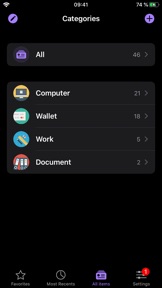
iPhone 屏幕截图

截屏
截屏
截屏
截屏
截屏

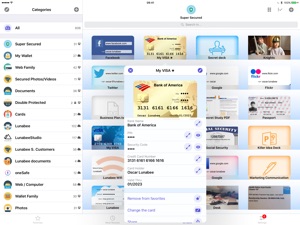
iPad 屏幕截图

截屏
截屏
截屏
截屏

简介

还在为密码犯难吗?找不到安全储存个人机密数据的地方?
oneSafe是最安全的袖珍保险库。
NEW! oneSafe now supports Dark Mode and many other iOS 13 improvements.
You can even sync your secured info across various devices via iCloud Drive or Dropbox to have your passwords available whenever and wherever you need them.
oneSafe protects your confidential information with AES-256 encryption; the highest level of encryption on mobile devices. Passwords, documents, photos, credit card numbers, bank account details, PIN codes and much more can all be locked away securely inside your safe – and at the same time be accessible whenever you need them. Plus, oneSafe adapts to your preferences allowing you to change the colors and images of your safe for maximum customization.
> THEY LOVE oneSafe
• Apple Editor's Choice, best new app in 80 countries!
• "oneSafe has cuter graphics than its rivals" [New York Times]
• "Even though oneSafe is incredibly powerful, it remains incredibly user-friendly." [iMore]
• "Listed in top password managers" [Cnet]
• "oneSafe is well built, robust, and easy to use" [Marco Tabini]
• "If you want to protect and secure your data like Fort Knox, oneSafe is your solution." [AppDictions.com]
oneSafe is ultra secure, easy to use and provides an unequaled user experience. Keep all your confidential information secure and easily accessible when you need it – with oneSafe!
> SECURITY first
oneSafe incorporates the strongest encryption algorithm available on mobile devices (AES-256). All your data is automatically encrypted as soon as it's stored in the app, even the synched content. oneSafe also makes your entry password unhackable by using encryption standards involving extremely complex calculations.
> SYNC your content, the way you want
• You control at all times which categories are synched and which are not.
• Your info is synched via iCloud or Dropbox. Before being sent to the server, it’s encrypted with AES-256 for the maximum possible level of security.
• You don't want to use the cloud? Choose the manual sync option!
> FEATURES that will make your life easier
• iOS universal search in Spotlight.
• Large step-by-step password reader.
• Create, browse and edit your items super easily.
• Use ready-made templates to quickly and easily enter your data.
• Back up your data (via email, iTunes or Wi-Fi) to be sure you’ll always have a copy in storage.
• Change the texture, icon and color for any of your items.
• Flag items as 'Favorites' for quick access to your most commonly used information.
• Use the ‘Search’ feature to find items quickly within your database.
• Sync the content of your safe between your devices using iCloud and/or Dropbox.
• Use the bullet-proof "Secure sharing" feature to share your confidential data with your family, friends or colleagues.
Store in complete security:
• Credit card numbers
• PIN codes and entry codes
• Social security and tax numbers
• Bank account details
• Usernames and passwords
• Documents in PDF, Word, Excel and more
• Private photos and videos

版本 5.0.7 中的新功能

Fix a crash when starting the App.

信息

类别

版本

5.0.7

大小

318.7 MB

Game Center

VPP Device Licensing

评分

评级:4+

兼容性

iOS 10.3 或更高

设备

iPhone 5, iPhone 5c, iPhone 5s, iPhone 6, iPhone 6 Plus, iPhone 6s, iPhone 6s Plus, iPhone SE, iPhone 7, iPhone 7 Plus, iPhone 8, iPhone 8 Plus, iPhone X, iPhone XR, iPhone XS, iPhone XS Max, iPhone 11, iPhone 11 Pro, iPhone 11 Pro Max, iPhone SE(第 2 代), iPad(第 4 代)(Wi-Fi), iPad(第 4 代)(4G), iPad(第 5 代)WLAN, iPad(第 5 代)WLAN + Cellular, iPad(第 6 代)WLAN, iPad(第 6 代)WLAN + Cellular, iPad Pro, iPad Pro (Cellular), iPad Pro(9.7 英寸), iPad Pro(9.7 英寸) (Cellular), iPad Pro(12.9 英寸,第 2 代), iPad Pro(12.9 英寸,第 2 代) WLAN + Cellular, iPad Pro(10.5 英寸), iPad Pro(10.5 英寸) WLAN + Cellular, iPad Pro(11 英寸), iPad Pro(11 英寸) WLAN + Cellular, iPad Pro(12.9 英寸,第 3 代), iPad Pro(12.9 英寸,第 3 代) Wi-Fi + Cellular, iPad Air, iPad Air (Cellular), iPad Air 2, iPad Air 2 (Cellular), iPad Air(第三代), iPad Air(第三代) WLAN + Cellular, iPad mini Retina, iPad mini Retina (Cellular), iPad mini 3, iPad mini 3 (Cellular), iPad mini 4, iPad mini 4 (Cellular), iPad mini(第 5 代), iPad mini(第 5 代)WLAN + Cellular, iPad(第 7 代)WLAN + Cellular, 11 英寸 iPad Pro(第 2 代), 11 英寸 iPad Pro(第 2 代) 无线局域网, 12.9 英寸 iPad Pro(第 4 代), 12.9 英寸 iPad Pro(第 4 代) 无线局域网, iPod touch(第六代), iPod touch(第 7 代), Apple Watch Series 4, Apple Watch Series 5

语言

中文, 俄文, 德文, 意大利文, 日文, 法文, 波兰文, 英文, 葡萄牙文, 西班牙文, 韩文

App Store:用户评分

评分及评论

2.5/5 (19 份评分)

App Store:买家评论

2020-06-16

更新后无法输入中文

更新后无法输入中文了?请尽快解决
heleioi
版本 5.0.5
2020-06-05

突然要输入密码

突然要输入秘密,根本没设置过密码,这是不让人用了吗
828840
版本 5.0.5
2020-04-19

什么时候支持windows 啊?

哪都好,就是没有win支持不太方便……
薄暮bude
版本 5.0.5
2020-01-08

破软件.密码忘了.无法找回

无法找回.输入之前的密码也不对。
悠游渔夫
版本 5.0.5
2020-01-06

更新后不支持中文了!!

用这个软件好几年了,当初买的时候不算便宜,看中了功能才买的,为什么iOS13后不支持中文输入法了呢?没法输入中文,搜索也就无法按中文关键词搜索了,更别谈新建中文文件了,请软件开发者尽快修复,谢谢了!
黯然难销魂
版本 5.0.5
2020-01-06

忘记以前备份的照片密码了 怎么找回

很久以前的照片回复备份 现在忘了密码 有什么方式可以找回
啵啵哒哒哒
版本 5.0.5
2020-01-03

出现错误,破软件,很有风险

自从升级之后,以前设置的密码怎么登陆都是错误,结果数据全废了,找不回来了
曾良兄
版本 5.0.5
2019-12-10

买了专业版,但 Bug 过多,非常失望。

Apple Watch 的功能不可用,
很多 Bug,
望早日修复
对方金额均低价出你的冷漠们
版本 5.0.3
2019-12-07

文件消失

更新完一直卡住,只能点两下就闪退,文件也是空的,希望尽快解决
山里有个头
版本 5.0.3
2019-12-06

什么时候能支持人脸识别解锁就好了,担心收费版转移不过去。

挺好的!
家养小怪兽
版本 5.0.3
2018-06-15

非常棒的软件!而且开发者也很有耐心

非常棒的软件,存银行卡,证件照都很不错!而且很安全,最重要的是开发者很有耐心,之前遗失了密码邮件联系开发者,每次都认真大福了!感谢!!!!还好问题解决了!再次感谢!!!
菜柠檬
版本 3.6.6
2017-12-26

我密码忘了要怎么办啊

前一段时间把指纹解锁取消了,现在弄回来有需要密码了,密码早就忘了
tcsabishi
版本 3.6.6
2017-12-09

软件问题

为什么上架更新后,就一直卡在密码界面,上不去啊?密码早就忘了,怎么找回?
Inthend
版本 3.6.6
2017-11-19

保存的照片 视频 无法储存到手机本地了

保存的照片 视频 无法储存到手机本地了。 保存就直接退出了app
工作中的eddy
版本 3.6.5
2017-11-16

存的视频怎么没有进度条了?

存的视频怎么没有进度条了?
!!!!@!#¥
版本 3.6.5
2017-11-04

6s无法快进

请尽快修复,我的是最新系统
pilot366
版本 3.6.5
2017-02-12

卡在启动界面进不去

卡在了启动界面进不去软件,界面只有一个软件的图标
77seventyone
版本 3.6.4
2017-02-08

很好

确实很好
Ffggjkiiff
版本 3.6.4
2017-02-02

很好用

非常好用
casiofans
版本 3.6.3
2017-02-01

拍照或录像会闪退

如题
文艺青年-且陶陶
版本 3.6.3
2017-01-29

挺好用的非常方便

安全性自我感觉挺高的,icloud备份密码也是加密了的;从此不怕密码忘记了
高考生Mr.L
版本 3.6.3
2017-01-24

不知道会不会泄密呀?不过很好用

不知道会不会泄密呀?不过很好用
cym_0806
版本 3.6.3
2017-01-22

nice software

nice
Aben CHAN
版本 3.6.3
2017-01-11

不错,很方便

就是别丢手机,否则密码全没
脚步丫
版本 3.6.2
2016-12-26

值得推荐

非常好,界面简洁,操作易上手。
Royffn
版本 3.6.2
2016-12-21

我觉得还行啊

我觉得还不错啊,是我要求太低了吗?
呜呜飞侠
版本 3.6.2
2016-12-20

好用

挺好用的,提供很多方便!
顾大宇
版本 3.6.2
2016-12-15

安全实用

软件的功能很好,存在里面的信息很安全。
GTXY5cwt
版本 3.6.2
2016-12-12

还不错

就是云备份没什么用,用来做基础备忘密码挺好使的
Zh_Geraldine
版本 3.6.2
2016-12-12

不错

可以
ZOo.
版本 3.6.2
2016-12-09

还是那不错的

用了以后确实方便不少,妈妈再也不怕我忘记账号密码了😁😁
SilverKira
版本 3.6.2
2016-12-07

so great!

The best secure app I've ever used! So convenient!
Phonesiphy
版本 3.6.2
2016-12-06

不错

好评,虽然界面美观度有待改进,但是用来备份密码很方便
eroyoung
版本 3.6.2
2016-11-21

还不错

还不错,就是担心安全问题
yuanwuzi
版本 3.5.0
2016-11-20

我想不起来密码了怎么办,为何没法找回

因为天天用指纹登陆的,今天突然要求必须用密码,但我想不起密码了,该如何才好啊,里面都是重要的密码啊
猫咪咪了了
版本 3.5.0
2016-11-19

备份打不开

上传的备份文件和本地电脑备份的都打不开,显示打不开开此类文件,请解决
星星评汪
版本 3.6.2
2016-11-17

不错

算是比较好用的一款密码管理App
不得不654
版本 3.6.2
2016-11-16

云备份形同虚设

虽然云备份不太好用,但是存在里面的文件都是用物理存储备份的,不联网更好
就是太难玩了152
版本 3.6.2
2016-11-13

太安全了,自己都进不去了

太安全了,自己都进不去了
总的来讲,不如笔记本好用
无奈无奈路人
版本 3.6.2
2016-11-12

点赞

真是用了好长时间了!赞赞赞。已经习惯了。
要无拘无束
版本 3.6.2
2016-11-12

就没人发现这个软件无法同步吗

软件内icloud同步每次都出错,这个太坑了
皮诺曹数码实话
版本 3.6.2
2016-11-11

不错的软件,值得推广

希望继续保持
天秤座小度
版本 3.6.2
2016-11-09

还不错啊

入侵报告功能挺实用。保存文件类型多。
完美,简直完美
版本 3.6.2
2016-11-06

不错
窗外景色依然
版本 3.6.2
2016-10-30

太差了,无法恢复数据

我的备份数据完全无法恢复,一点用都没有
口香糖88
版本 3.6.2
2016-10-29

不错

不错
棒棒糖还wo
版本 3.6.2
2016-10-26

很好用

其实非常好用,特别密码太多记不住的话
芭蕾吴老师
版本 3.6.2
2016-10-25

好是好,可惜不是中文

我下载了很多次了,都不知道哪里设置中文的。只有英文,看都看不懂。这里是中国。
shingapple
版本 3.6.2
2016-10-24

好用

适合我这些“老人家”
钟jieyin
版本 3.6.2