正在更新


iPhone 屏幕截图


iPad 屏幕截图



简介
**If you can not access the music library on iOS10, check that mimiCopy is ON in "Settings" in "Privacy" -> "Media Library".
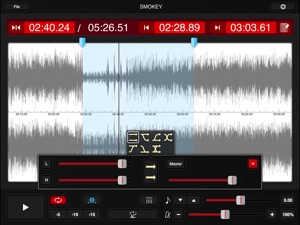
mimiCopy is a music player that helps guitarists and other musicians 'learn by ear' a track of their choice. You can playback at slower speed without any change in pitch, or use the waveform view to skip to a particular segment or set a loop. You can also load your favorite track from your iPod library!
Main features
- Time stretch function for playing back at different speeds without any change in pitch.
Ideal for slow playback of fast phrases.
(Features the high-quality time stretch engine(*1))
(speed controlrange:25%-200%)
- pitch shift function. Adjustment range: ±1 octave
- Waveform view for easily skipping to a desired segment or setting a (A-B)loop.
- Simple (A-B)loop setup by tapping the start and end positions during playback. Loop intervals can be set to three locations.
- Quick rewind function for going back to replay just the few seconds that you've missed.
- Supports importing of tracks from your iPod library.(*2)
- File import via WiFi or USB.
- Option to disable Auto-Lock while the main view is open.
- Universal app (supports iPhone, iPod touch, and iPad).
- Memo function.
- Flexible audio routing. mimiCopy has its own volume control. It can also adjust the right and left volume. or can change the right and left channel.
- Intuitive and hassle-free interface.
Let mimiCopy be your handy sidekick in your music life.
* Some functions are features of the Pro version. Pro version users must register (registration is free).
Suggested Usage
- Transcribe speeches, interviews, conferences, etc.
- Enjoy seminars and podcasts at faster (or slower) speed.
(High-quality time stretch engine makes listening easier than with iPod's generic 1/2x and 2x playback)
---
If mimiCopy shows "unknown error", try following:
http://support.apple.com/kb/HT4211?viewlocale=en_US
---
When the dialog of opening cannot be closed, please force the app to close or reboot your device. .
Force the app to close:
1. From the Home screen, double-click the Home button to display recently used apps.
2. Tap and hold the app until a red minus appears. Tap the red minus to quit the app.
3. Tap on the Home screen, above, to return.
----
Became a fan of mimiCopy on Facebook!
http://www.facebook.com/mimiCopyApp
(*1)Featuring the time stretch engine by P SOFTHOUSE Co.,Ltd.
(*2)DRM protected files(Song bought from iTunes) are not supported. iTunes Plus files are supported. Other files may not be supported depending on the encoding format.
版本 1.7.1 中的新功能
Fixed a problem where folder playback did not work properly.
卖方
名称
ART Teknika, Inc.
信息
类别
版本
1.7.1
大小
6 MB
Game Center
否
VPP Device Licensing
是
评分
评级:4+
兼容性
iOS 8.0 或更高
设备
iPhone 4S, iPhone 5, iPhone 5c, iPhone 5s, iPhone 6, iPhone 6 Plus, iPhone 6s, iPhone 6s Plus, iPhone SE, iPhone 7, iPhone 7 Plus, iPhone 8, iPhone 8 Plus, iPhone X, iPhone XR, iPhone XS, iPhone XS Max, iPhone 11, iPhone 11 Pro, iPhone 11 Pro Max, iPhone SE(第 2 代), iPad 2(Wi-Fi), iPad 2(3G), iPad(第三代)(Wi-Fi), iPad(第三代)(4G), iPad(第 4 代)(Wi-Fi), iPad(第 4 代)(4G), iPad(第 5 代)WLAN, iPad(第 5 代)WLAN + Cellular, iPad(第 6 代)WLAN, iPad(第 6 代)WLAN + Cellular, iPad Pro, iPad Pro (Cellular), iPad Pro(9.7 英寸), iPad Pro(9.7 英寸) (Cellular), iPad Pro(12.9 英寸,第 2 代), iPad Pro(12.9 英寸,第 2 代) WLAN + Cellular, iPad Pro(10.5 英寸), iPad Pro(10.5 英寸) WLAN + Cellular, iPad Pro(11 英寸), iPad Pro(11 英寸) WLAN + Cellular, iPad Pro(12.9 英寸,第 3 代), iPad Pro(12.9 英寸,第 3 代) Wi-Fi + Cellular, iPad Air, iPad Air (Cellular), iPad Air 2, iPad Air 2 (Cellular), iPad Air(第三代), iPad Air(第三代) WLAN + Cellular, iPad mini (Wi-Fi), iPad mini (4G), iPad mini Retina, iPad mini Retina (Cellular), iPad mini 3, iPad mini 3 (Cellular), iPad mini 4, iPad mini 4 (Cellular), iPad mini(第 5 代), iPad mini(第 5 代)WLAN + Cellular, iPad(第 7 代)WLAN, 11 英寸 iPad Pro(第 2 代), 11 英寸 iPad Pro(第 2 代) 无线局域网, 12.9 英寸 iPad Pro(第 4 代), 12.9 英寸 iPad Pro(第 4 代) 无线局域网, iPad Air4, iPad Air4Cellular, iPad EighthGen, iPad EighthGenCellular, iPod touch(第 5 代), iPod touch(第六代), iPod touch(第 7 代)
语言
日文, 英文
App Store:用户评分
评分及评论
3.0/5 (4 份评分)
App Store:买家评论
无条目