关于条款隐私政策联系
 
正在更新
Clinometer + bubble level

Clinometer + bubble level

发布日期:2019-02-07
© 2019 plaincode
Clinometer + bubble level - QR码
版本 4.9.4
4+
App Store 下载
版本 4.9.4
4+
App Store 下载
发布日期:2019-02-07
© 2019 plaincode

iPhone 屏幕截图

截屏
截屏
截屏
截屏
截屏

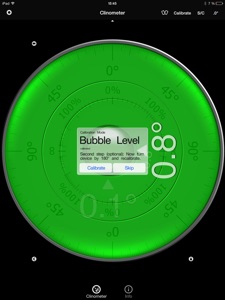
iPad 屏幕截图

截屏
截屏
截屏
截屏
截屏

简介

This professional tool called Clinometer is the most precise (all you can get with some calculations) slope measurement tool for the iPhone, iPod Touch and iPad using all sides of the device plus the camera. It can be used for simple applications like aligning a frame as well as for more sophisticated fields of applications where an arbitrary slope needs to be measured exactly. Read the reviews (and write your own) for all the applications you find! Thank for all your positive feedback! Please use our support link if you have questions and suggestions, we don't read the iTunes reviews every day!
With this tool, the slope can be measured by all edges of the device and through the camera. The current features include:
◆ 3 Modes (incl. auto switching): Clinometer mode (auto when holding upright), Camera mode (any direction, manual activation) and Bubble level (smoothly fading in when holding flat).
◆ Relative angles: Besides measuring absolute angles, for every mode you can measure the relative angle between device positions
◆ Advanced two way calibration on all sides: For every 4 sides plus the bubble mode you can calibrate in two steps, which allows you to calibrate exactly even on non-level surfaces. Each direction can be calibrated individually to achieve the optimal precision.
◆ Speech synthesis: The device will speak the current reading, so you don't have to watch the display while measuring/aligning your object.
◆ Five different unit modes: The device can display the slope in degrees (rounded or in tenth of degrees), percentage, rise over run (common for roof slope measurement in :12) and 1V:H (common in engineering)
◆ Dial Rotation: You can smoothly rotate the background dial and thus define which side of the device represents 0° and 90° degrees.
◆ Motion-sensitive Lock feature: Besides the common instant simple tap hold mechanism you can activate the motion-sensitive lock. If activated the device waits for the final lock until you hold your device steady enough for at least 2 seconds. You can set the lock sensitivity between 0.1° and 1.0° degrees.
◆ Peer Mode: Use two devices to measure angles: One as a display, the other as the measurement device that can be attached to the hardware you want to align.
◆ Fullscreen Mode: The full screen mode can be toggled by tapping the center of the screen and by the upper and lower arrows in the center. This prevents you from erroneous inputs while measuring.
◆ Different color schemes: Press the S/C Button to instantly switch the color. The color can be selected differently for the bubble and the clinometer mode. The predefined color sets include day and night color schemes (Black on White, White on Black and Red).
◆ Adjustable Auto-Lock: You can prevent the device from turning into the sleep mode.
According to wikipedia: An inclinometer or clinometer is an instrument for measuring angles of slope (or tilt), elevation or inclination of an object with respect to gravity. It is also known as a tilt meter, tilt indicator, slope alert, slope gauge, gradient meter, gradiometer, level gauge, level meter, declinometer, and pitch & roll indicator.
For recreational use only. After the calibration it CAN (!) be very accurate especially for the main axis after calibration. The measurement is performed as well as possible (we try our best) by using the three inbuilt accelerometers.
THANK YOU FOR YOUR SUPPORT!
We will improve the application long-term. This was the first application of this kind shortly after the opening of the App Store. Since then it is continuously updated and enriched with new features.

版本 4.9.4 中的新功能

Fix rotation issue

信息

类别

版本

4.9.4

大小

15 MB

Game Center

VPP Device Licensing

评分

评级:4+

兼容性

iOS 11.0 或更高

设备

iPhone 5s, iPhone 6, iPhone 6 Plus, iPhone 6s, iPhone 6s Plus, iPhone SE, iPhone 7, iPhone 7 Plus, iPhone 8, iPhone 8 Plus, iPhone X, iPhone XR, iPhone XS, iPhone XS Max, iPhone 11, iPhone 11 Pro, iPhone 11 Pro Max, iPhone SE(第 2 代), iPhone 12, iPhone 12 Pro, iPhone 12 Pro Max, iPhone 12 mini, iPhone 13, iPhone 13 Pro, iPhone 13 Pro Max, iPhone 13 mini, iPhone SE(第 3 代), iPhone 14, iPhone 14 Plus, iPhone 14 Pro, iPhone 14 Pro Max, iPhone 15, iPhone 15 Plus, iPhone 15 Pro, iPhone 15 Pro Max, iPhone 16, iPhone 16Plus, iPhone 16Pro, iPhone 16ProMax, iPad(第 5 代)WLAN, iPad(第 5 代)WLAN + Cellular, iPad(第 6 代)WLAN, iPad(第 6 代)WLAN + Cellular, iPad Pro, iPad Pro (Cellular), iPad Pro(9.7 英寸), iPad Pro(9.7 英寸) (Cellular), iPad Pro(12.9 英寸,第 2 代), iPad Pro(12.9 英寸,第 2 代) WLAN + Cellular, iPad Pro(10.5 英寸), iPad Pro(10.5 英寸) WLAN + Cellular, iPad Pro(11 英寸), iPad Pro(11 英寸) WLAN + Cellular, iPad Pro(12.9 英寸,第 3 代), iPad Pro(12.9 英寸,第 3 代) Wi-Fi + Cellular, iPad Air, iPad Air (Cellular), iPad Air 2, iPad Air 2 (Cellular), iPad Air(第三代), iPad Air(第三代) WLAN + Cellular, iPad mini Retina, iPad mini Retina (Cellular), iPad mini 3, iPad mini 3 (Cellular), iPad mini 4, iPad mini 4 (Cellular), iPad mini(第 5 代), iPad mini(第 5 代)WLAN + Cellular, iPad(第 7 代)WLAN + Cellular, 11 英寸 iPad Pro(第 2 代), 11 英寸 iPad Pro(第 2 代) 无线局域网, 12.9 英寸 iPad Pro(第 4 代), 12.9 英寸 iPad Pro(第 4 代) 无线局域网, iPad Air(第 4 代)(Wi-Fi), iPad Air(第 4 代)(WLAN + Cellular), iPad(第 8 代)WLAN, iPad(第 8 代)WLAN + Cellular, 11 英寸 iPad Pro(第 3 代), 11 英寸 iPad Pro(第 3 代) 无线局域网, 12.9 英寸 iPad Pro(第 5 代), 12.9 英寸 iPad Pro(第 5 代) 无线局域网, iPad(第 9 代), iPad(第 9 代)WLAN + Cellular, iPad mini(第 6 代), iPad mini(第 6 代)WLAN + Cellular, iPad Air(第 5 代), iPad Air(第 5 代) Wi-Fi + Cellular, 11 英寸 iPad Pro(第 4 代), 11 英寸 iPad Pro(第 4 代) 无线局域网, 12.9 英寸 iPad Pro(第 6 代), 12.9 英寸 iPad Pro(第 6 代) 无线局域网, iPad(第 10 代), iPad(第 10 代) 无线局域网, 11 英寸 iPad Air (M2) 无线局域网机型, 13 英寸 iPad Air (M2) 无线局域网机型, 13 英寸 iPad Air (M2) 无线局域网 + 蜂窝网络机型, 11 英寸 iPad Pro (M4) 无线局域网机型, 11 英寸 iPad Pro (M4) 无线局域网 + 蜂窝网络机型, 13 英寸 iPad Pro (M4) 无线局域网机型, 13 英寸 iPad Pro (M4) 无线局域网 + 蜂窝网络机型, iPad MiniA17Pro, iPad MiniA17ProCellular, iPod touch(第六代), iPod touch(第 7 代), Apple Watch Series 4

语言

德文, 法文, 英文

App Store:用户评分

评分及评论

4.5/5 (4 份评分)

App Store:买家评论

2018-02-04

Awesome!!!

Nice app!
Macwish
版本 4.6
2016-11-25

推荐使用!

推荐使用!推荐使用!推荐使用!
竹海宸哥
版本 4.5
2016-11-10

没有中文.

英文有些看不太明白.希望以后更新添加中文!
夜、礼服
版本 4.5
2014-02-20

还不错

不错
汉儒
版本 4.1
2013-10-22

没中文

语音播报是中文,软件却没中文,秀逗了?
call me 先生
版本 4.0
2012-06-29

不知道该怎么校准...好复杂

如题
鈞臨天下
版本 3.4.1
2011-09-17

非常好

如题
BG7PRQ
版本 3.4
2009-01-22

生动

本次更新好
YT6523