关于条款隐私政策联系
 
正在更新
UPAD V

UPAD V

发布日期:2018-07-25
© PockeySoft
UPAD V - QR码
版本 5.0
4+
App Store 下载
版本 5.0
4+
App Store 下载
发布日期:2018-07-25
© PockeySoft

iPhone 屏幕截图

截屏
截屏
截屏
截屏
截屏

iPad 屏幕截图

截屏
截屏
截屏
截屏
截屏

简介

Finally, UPAD has re-arrived!
When downloading UPAD, your iPad becomes more of a worthy instrument.
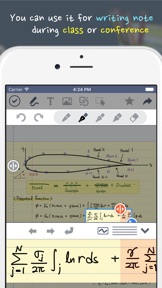
UPAD is the best application for handwriting. Write on it, just like you would on a sheet of paper.
You can use this for a diary, planner, lecture note, conference note, letters, Calligraphy, etc.
Create documents with easier-than-ever-to-use interface and a variety of features
[The best feel of writing]
- Write fast and easy—like when you handwrite on a sheet of paper.
- When you’re listening to a lecture or at a conference, you can draw, modify, and write fast.
- You may rest your palm on the screen. It is made to recognize just the touch-pen.
- No other application allows the feeling of writing like UPAD.
- It allows the “real” feeling of handwriting.
[PDF Editing]
- Read and edit PDF files with UPAD.
- Edit PDF files with add/copy/delete functions.
- Add handwriting, texts, pictures, etc. to PDF files.
- Manage theses, lecture notes, manuals, musical notes, etc. in PDF format effectively.
[Easier-than-ever-to-use image insertion]
- Save multiple pictures in a form of documents easily.
- You can capture a part of a map or web page and save it to a file.
- This provides you with special effects and frames that will enhance images.
- You no longer need to move back and forth from one application to another.
[Typing]
- You can enter words by using a keyboard.
- This includes various fonts, sizes, backgrounds, and alignments that are in Microsoft Word.
[Shapes]
- You can put in callouts, rectangles, arrows, circles, etc. easily.
- You’ll be able to draw a table easily.
[Sharing documents]
- You’ll be able to share not only emails, but SMS such as Facebook and Tweeter through iMessage.
- You can print out documents immediately through Air Printer.
- You can send UPAD documents to all applications that can read images and PDF’s.
[A variety of easy templates]
- Set up schedules monthly/weekly/daily.
- This provides various templates you need when you create a document.
- You may use the image of your choice as the background.
[Safe backing-up]
- You can now back-up not only as a whole, but partially—one document at a time.
- It’s possible to back-up and restore quickly and stably.
This app is not support iCloud sync.

版本 5.0 中的新功能

This app has been updated by Apple to display the Apple Watch app icon.

卖方

名称

kim genie

信息

开发商

类别

版本

5.0

大小

38.7 MB

Game Center

VPP Device Licensing

评分

评级:4+

兼容性

iOS 9.0 或更高

设备

iPhone 4S, iPhone 5, iPhone 5c, iPhone 5s, iPhone 6, iPhone 6 Plus, iPhone 6s, iPhone 6s Plus, iPhone SE, iPhone 7, iPhone 7 Plus, iPhone 8, iPhone 8 Plus, iPhone X, iPhone XR, iPhone XS, iPhone XS Max, iPhone 11, iPhone 11 Pro, iPhone 11 Pro Max, iPhone SE(第 2 代), iPhone 12, iPhone 12 Pro, iPhone 12 Pro Max, iPhone 12 mini, iPhone 13, iPhone 13 Pro, iPhone 13 Pro Max, iPhone 13 mini, iPhone SE(第 3 代), iPhone 14, iPhone 14 Plus, iPhone 14 Pro, iPhone 14 Pro Max, iPhone 15, iPhone 15 Plus, iPhone 15 Pro, iPhone 15 Pro Max, iPhone 16, iPhone 16Plus, iPhone 16Pro, iPhone 16ProMax, iPhone 16e, iPad 2(Wi-Fi), iPad 2(3G), iPad(第三代)(Wi-Fi), iPad(第三代)(4G), iPad(第 4 代)(Wi-Fi), iPad(第 4 代)(4G), iPad(第 5 代)WLAN, iPad(第 5 代)WLAN + Cellular, iPad(第 6 代)WLAN, iPad(第 6 代)WLAN + Cellular, iPad Pro, iPad Pro (Cellular), iPad Pro(9.7 英寸), iPad Pro(9.7 英寸) (Cellular), iPad Pro(12.9 英寸,第 2 代), iPad Pro(12.9 英寸,第 2 代) WLAN + Cellular, iPad Pro(10.5 英寸), iPad Pro(10.5 英寸) WLAN + Cellular, iPad Pro(11 英寸), iPad Pro(11 英寸) WLAN + Cellular, iPad Pro(12.9 英寸,第 3 代), iPad Pro(12.9 英寸,第 3 代) Wi-Fi + Cellular, iPad Air, iPad Air (Cellular), iPad Air 2, iPad Air 2 (Cellular), iPad Air(第三代), iPad Air(第三代) WLAN + Cellular, iPad mini (Wi-Fi), iPad mini (4G), iPad mini Retina, iPad mini Retina (Cellular), iPad mini 3, iPad mini 3 (Cellular), iPad mini 4, iPad mini 4 (Cellular), iPad mini(第 5 代), iPad mini(第 5 代)WLAN + Cellular, iPad(第 7 代)WLAN + Cellular, 11 英寸 iPad Pro(第 2 代), 11 英寸 iPad Pro(第 2 代) 无线局域网, 12.9 英寸 iPad Pro(第 4 代), 12.9 英寸 iPad Pro(第 4 代) 无线局域网, iPad Air(第 4 代)(Wi-Fi), iPad Air(第 4 代)(WLAN + Cellular), iPad(第 8 代)WLAN, iPad(第 8 代)WLAN + Cellular, 11 英寸 iPad Pro(第 3 代), 11 英寸 iPad Pro(第 3 代) 无线局域网, 12.9 英寸 iPad Pro(第 5 代), 12.9 英寸 iPad Pro(第 5 代) 无线局域网, iPad(第 9 代), iPad(第 9 代)WLAN + Cellular, iPad mini(第 6 代), iPad mini(第 6 代)WLAN + Cellular, iPad Air(第 5 代), iPad Air(第 5 代) Wi-Fi + Cellular, 11 英寸 iPad Pro(第 4 代), 11 英寸 iPad Pro(第 4 代) 无线局域网, 12.9 英寸 iPad Pro(第 6 代), 12.9 英寸 iPad Pro(第 6 代) 无线局域网, iPad(第 10 代), iPad(第 10 代) 无线局域网, 11 英寸 iPad Air (M2) 无线局域网机型, 13 英寸 iPad Air (M2) 无线局域网机型, 13 英寸 iPad Air (M2) 无线局域网 + 蜂窝网络机型, 11 英寸 iPad Pro (M4) 无线局域网机型, 11 英寸 iPad Pro (M4) 无线局域网 + 蜂窝网络机型, 13 英寸 iPad Pro (M4) 无线局域网机型, 13 英寸 iPad Pro (M4) 无线局域网 + 蜂窝网络机型, iPad A16, iPad A16Cellular, iPad Air11M3, iPad Air11M3Cellular, iPad Air13M3, iPad Air13M3Cellular, iPad MiniA17Pro, iPad MiniA17ProCellular, iPod touch(第 5 代), iPod touch(第六代), iPod touch(第 7 代)

语言

英文, 韩文

App Store:用户评分

评分及评论

4.1/5 (29 份评分)

App Store:买家评论

2021-03-03

怎么打开ppt

upad v 是不是包含iCloud版本的所有功能?如何打开ppt呢求教555555
qorizon
版本 5.0
2020-02-24

移动文件会闪退?

移动导入的pdf会闪退?
重新加载文件夹就行了。。
LRLVRC
版本 5.0
2020-02-22

误删之后文件怎么恢复?

误删之后文件怎么恢复?
“变化百出沸腾后加入盐
版本 5.0
2019-10-19

千万别买

浪费钱
却无声无息耐心哦说
2019-02-09

Language Setting

How can I change language?
燃油泵
2018-11-15

不更新的应用

无语
昵称总是别人已用