正在更新


iPhone 屏幕截图


简介
The CZ Rally app is designed for a particular type of automobile rally called a Control Zone Rally or for any rally with a single stage having a single average speed the must be maintained over the entire stage.
In a Control Zone Rally you are given some combination of time, speed, and distance required to traverse a course from a defined starting point to a finish line. Your starting time will also be assigned as some minute or half minute after the hour in which the race begins.
Set these conditions by touching the Setup button to access a screen where the starting time, course time, course speed, or course distance can be entered. When you've set these conditions, touch the green New Rally button in the upper right hand corner of the screen to return to the main screen where a map and your progress will be recorded.
The Start Now! button allows starting a new rally or a leg of a rally with a single click. This allows you to preset time, speed, and distance for the upcoming leg, and to touch the button exactly when the new leg begins. In other words, with the Start Now! feature, the user doesn't wait until the clock ticks down to a defined starting minute or minute and a half.
GPS inputs trace the path along the rally route. Measurements of actual versus ideal time and distance will be shown in seconds ahead or behind schedule. From time to time you may also record time and distance covered an the error against the ideal course time and distance by touching the "Add Split" button.
Options include subtraction of distance when you travel off course. A toggle button switches between on course (blue line) and off course (red line) travel. Time splits can be set for automatic error checks.
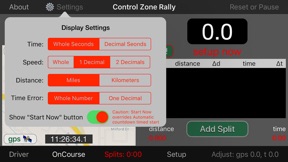
Distance measurement can be set to miles or kilometers and time measurement can be set to minutes and seconds or decimal minutes. Make your selections in the app preferences in the iPhone Settings.
You may fine-tune the app's distance and clock figures to the rally's official measures with the options in the Adjust popup. Unlock to make adjustments and lock to save the changes you make and to prevent inadvertent changes.
Distance measurement can be set to miles or kilometers and time measurement can be set to minutes and seconds or decimal minutes. Make your selections in the app preferences in the iPhone Settings linked with a "sprocket" button beside the "About" button..
The app is designed to adjust the GPS coordinates of a moving vehicle owing to the time between reception of new GPS signals and to the time lag between the time the signal was generated from satellites and the time when processing actually occurs in the app.
Also, you may adjust the location coordinate by the distance between the GPS receiver in the car (either the iPhone or iPad) and the position on the car where a rally may measure time or location at timed controls (sometimes this is the front of the car or the center of the front wheels).
These three potential errors in coordinate measurement are discussed at length in a 6-part thread in the Facebook "Road Rally Tech Talk" forum.
To fine-tune the app's distance between GPS receiver and front wheels (if necessary) and clock time figures to the rally's official measures with the options in the Adjustments popup. Unlock to make adjustments and lock to save the changes you make and to prevent inadvertent changes.
If the app's Time of Day (T.O.D.) clock shown at the bottom of the map view does not match the rally's official clock, you may synchronize the two clocks by making small adjustments as required.
A heads-up display for the Driver shows the time error, the time remaining for the course, the distance error, and the average speed for the course.
Disclaimer: Continued use of GPS running in the background can dramatically decrease battery life.
版本 8.3 中的新功能
- Removed support for third-party GPS receivers for improved operation, performance, and precision.
信息
开发商
类别
版本
8.3
大小
1.1 MB
Game Center
否
VPP Device Licensing
是
评分
评级:4+
兼容性
iOS 13.6 或更高
设备
iPhone 5s, iPhone 6, iPhone 6 Plus, iPhone 6s, iPhone 6s Plus, iPhone SE, iPhone 7, iPhone 7 Plus, iPhone 8, iPhone 8 Plus, iPhone X, iPhone XR, iPhone XS, iPhone XS Max, iPhone 11, iPhone 11 Pro, iPhone 11 Pro Max, iPhone SE(第 2 代), iPhone 12, iPhone 12 Pro, iPhone 12 Pro Max, iPhone 12 mini, iPhone 13, iPhone 13 Pro, iPhone 13 Pro Max, iPhone 13 mini, iPhone SE(第 3 代), iPhone 14, iPhone 14 Plus, iPhone 14 Pro, iPhone 14 Pro Max, iPhone 15, iPhone 15 Plus, iPhone 15 Pro, iPhone 15 Pro Max, iPhone 16, iPhone 16 Plus, iPhone 16 Pro, iPhone 16 Pro Max, iPhone 16e, iPad(第 5 代)WLAN, iPad(第 5 代)WLAN + Cellular, iPad(第 6 代)WLAN, iPad(第 6 代)WLAN + Cellular, iPad Pro, iPad Pro (Cellular), iPad Pro(9.7 英寸), iPad Pro(9.7 英寸) (Cellular), iPad Pro(12.9 英寸,第 2 代), iPad Pro(12.9 英寸,第 2 代) WLAN + Cellular, iPad Pro(10.5 英寸), iPad Pro(10.5 英寸) WLAN + Cellular, iPad Pro(11 英寸), iPad Pro(11 英寸) WLAN + Cellular, iPad Pro(12.9 英寸,第 3 代), iPad Pro(12.9 英寸,第 3 代) Wi-Fi + Cellular, iPad Air, iPad Air (Cellular), iPad Air 2, iPad Air 2 (Cellular), iPad Air(第三代), iPad Air(第三代) WLAN + Cellular, iPad mini Retina, iPad mini Retina (Cellular), iPad mini 3, iPad mini 3 (Cellular), iPad mini 4, iPad mini 4 (Cellular), iPad mini(第 5 代), iPad mini(第 5 代)WLAN + Cellular, iPad(第 7 代)WLAN + Cellular, 11 英寸 iPad Pro(第 2 代), 11 英寸 iPad Pro(第 2 代) 无线局域网, 12.9 英寸 iPad Pro(第 4 代), 12.9 英寸 iPad Pro(第 4 代) 无线局域网, iPad Air(第 4 代)(Wi-Fi), iPad Air(第 4 代)(WLAN + Cellular), iPad(第 8 代)WLAN, iPad(第 8 代)WLAN + Cellular, 11 英寸 iPad Pro(第 3 代), 11 英寸 iPad Pro(第 3 代) 无线局域网, 12.9 英寸 iPad Pro(第 5 代), 12.9 英寸 iPad Pro(第 5 代) 无线局域网, iPad(第 9 代), iPad(第 9 代)WLAN + Cellular, iPad mini(第 6 代), iPad mini(第 6 代)WLAN + Cellular, iPad Air(第 5 代), iPad Air(第 5 代) Wi-Fi + Cellular, 11 英寸 iPad Pro(第 4 代), 11 英寸 iPad Pro(第 4 代) 无线局域网, 12.9 英寸 iPad Pro(第 6 代), 12.9 英寸 iPad Pro(第 6 代) 无线局域网, iPad(第 10 代), iPad(第 10 代) 无线局域网, 11 英寸 iPad Air (M2) 无线局域网机型, 13 英寸 iPad Air (M2) 无线局域网机型, 13 英寸 iPad Air (M2) 无线局域网 + 蜂窝网络机型, 11 英寸 iPad Pro (M4) 无线局域网机型, 11 英寸 iPad Pro (M4) 无线局域网 + 蜂窝网络机型, 13 英寸 iPad Pro (M4) 无线局域网机型, 13 英寸 iPad Pro (M4) 无线局域网 + 蜂窝网络机型, iPad mini (A17 Pro) 无线局域网机型, iPad mini (A17 Pro) 无线局域网 + 蜂窝网络机型, iPad (A16) 无线局域网机型, iPad (A16) 无线局域网 + 蜂窝网络机型, 11 英寸 iPad Air (M3) 无线局域网机型, 11 英寸 iPad Air (M3) 无线局域网 + 蜂窝网络机型, 13 英寸 iPad Air (M3) 无线局域网机型, 13 英寸 iPad Air (M3) 无线局域网 + 蜂窝网络机型, iPod touch(第六代), iPod touch(第 7 代)
语言
英文
App Store:用户评分
评分及评论
0.0/5 (无平价)
App Store:买家评论
无条目